Skip to content

Incident Management Software That Closes the Loop

Stop losing track of incident reports and corrective actions. The EHS‑Dashboard™ connects reporting, investigations, corrective actions, and OSHA recordkeeping in one system.

Demo Page  (2)

Does This Incident Process Sound Familiar?

check-icon-1
Incident reports arrive days late, on paper, or without the details needed for an investigation.
check-icon-1
Corrective actions stall because no one owns the follow-up.
check-icon-1
OSHA 300 logs and incident rates get rebuilt from spreadsheets every year-end.

Filing an incident report is the easy part. The real challenge comes next.  Someone still has to alert leadership, open an investigation, assign the fix, confirm it worked, and record the case correctly for OSHA. When those steps get scattered across inboxes and spreadsheets, follow-up can slip and the same hazard causes the next injury. Our incident management software connects every one of those steps in a single record.

incident Spot patterns

What Is Incident Management Software?

Incident management software is a system EHS teams use to report, investigate, correct, and analyze workplace incidents in one place. It replaces paper forms, email chains, and spreadsheets with digital reports, automated notifications, assigned corrective and preventive actions (CAPAs), and calculated safety metrics.

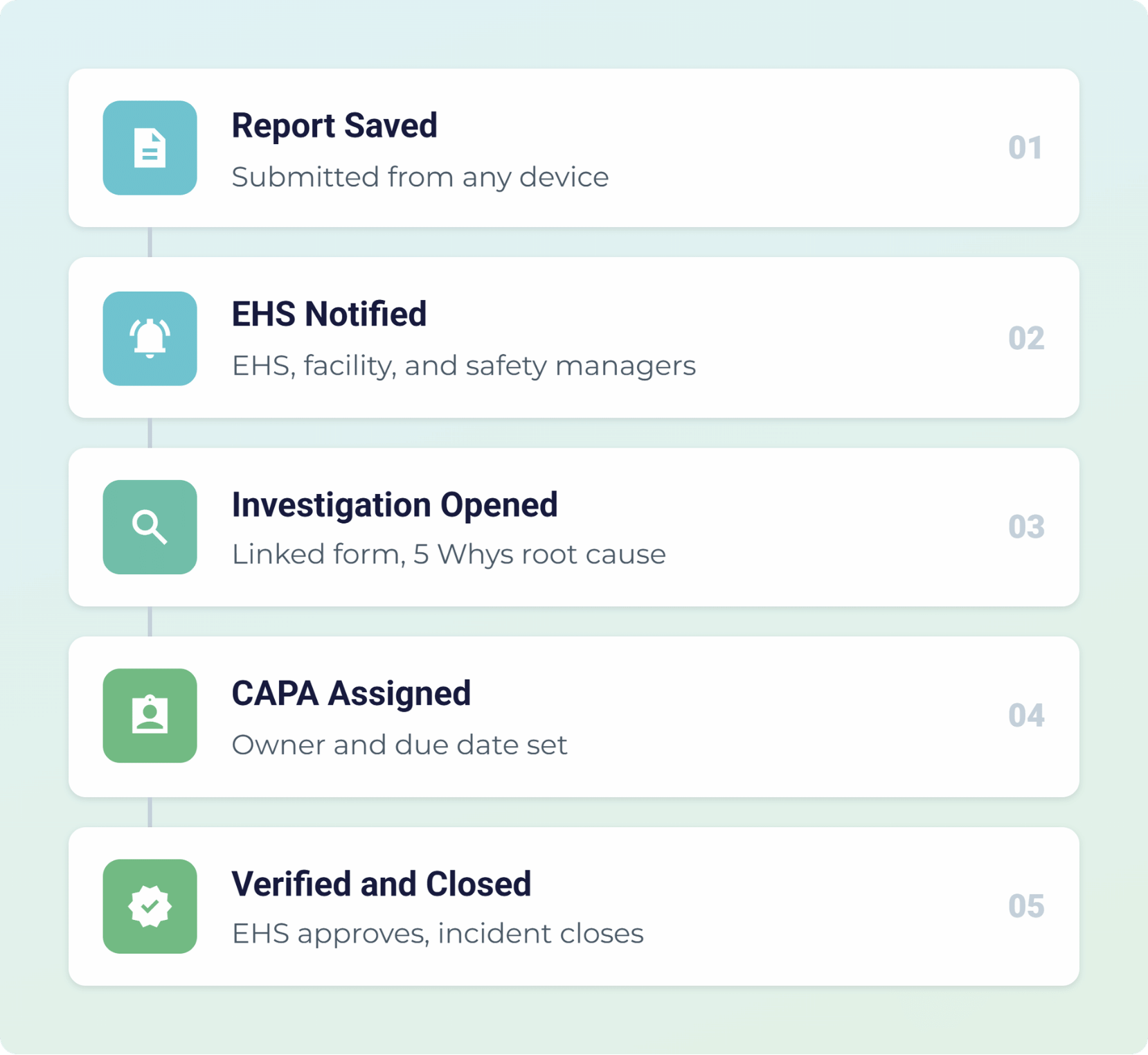
The difference between a reporting tool and real incident management is what happens after someone clicks submit. In the EHS-Dashboard™, a saved report can notify your EHS manager, open a linked investigation, generate a CAPA with an owner and due date, and update your OSHA recordable rates without anyone entering the data twice.

Why Do Incidents Repeat After the Report Is Filed?

Reporting an incident doesn't mean the hazard has been resolved.

Paper and spreadsheets break down the moment an incident needs coordination. The report, investigation notes, and corrective action can end up in different places, so late reports can mean lost witness details, and unresolved CAPAs can leave hazards in place. Here's how the
EHS‑Dashboard™ closes each gap.

check-icon-1
Late and Incomplete Reports

Paper forms can reach the EHS team days after the event, often missing witness names, the body part affected, or the immediate actions taken.

check-icon-1
Corrective Actions Without Owners

Fixes agreed upon during an investigation can stall when no one is assigned, no due date is set, and no reminder goes out.

check-icon-1
Recordkeeping Rebuilt by Hand

OSHA 300 entries and incident rates get recalculated from spreadsheets at year-end, increasing the risk of errors.

incident-report-form

How Do Employees Report Incidents and Near-Misses?

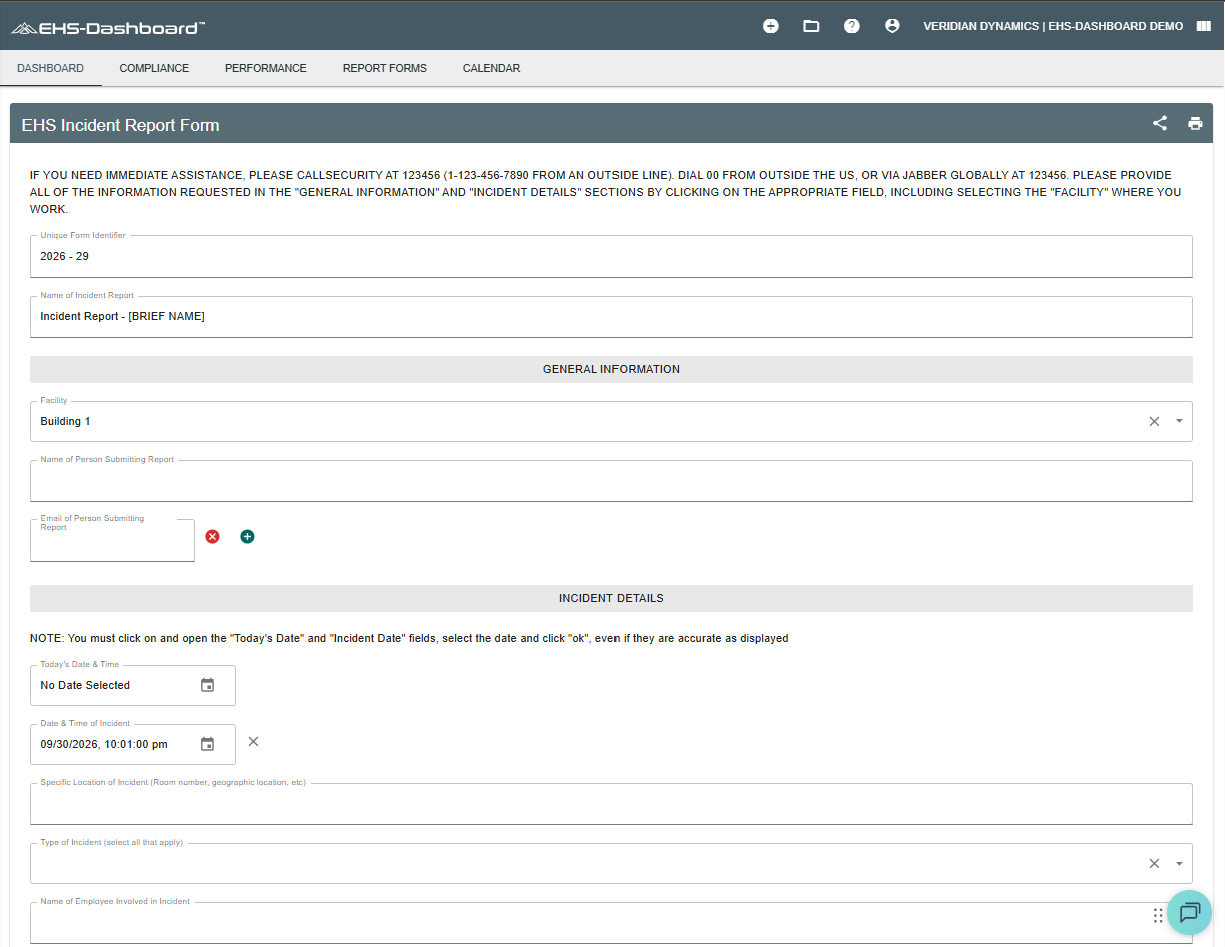
Every report starts with a custom form your EHS team builds to match how incidents actually happen at your sites.

Build forms for injuries, illnesses, near-misses, property damage, environmental events, and good catches in the Custom Forms builder, with no developer or consultant required.

  • Capture the details investigators need. Record employee, department, supervisor, shift, location, incident type, witnesses, immediate actions, body part affected, and medical treatment. 

  • Show only relevant questions. Conditional logic shows or hides fields based on earlier answers, so a near-miss reporter doesn't have to wade through injury fields. 

  • Track severity and responsibility. Calculated fields score severity or risk as the form is filled in, and each record ties back to a facility, responsible party, and status. 

  • Make forms easy to access. Share a direct link or QR code posted at the site so employees can submit reports from a browser on their phone or tablet.

Switching from spreadsheets doesn't mean starting your trend lines at zero. Import historical incident records from Excel into the same form, so year-over-year comparisons work from your first day in the incident management software. 

Everything You Need for Better Incident Reporting

Six tools that get the right details from the floor to your EHS team on the first try.

clipboard

Custom Incident Forms

Build injury, illness, near-miss, property damage, and environmental event forms in your own terminology.
checkrule

Conditional Logic

Show follow-up questions only when an answer calls for them, so reports stay short and complete.
calcu

Calculated Risk Scores

Score severity or risk from numeric, date, and dropdown answers the moment the reporter selects them.
Flame (1)

Direct Links and QR Codes

Post a QR code on the floor or share a link with location fields already filled in.
cam

Photos and Attachments

Attach photos, witness statements, and supporting files directly to the incident record.
import

Historical Data Imports

Import past incident records from Excel, so trend analysis starts with your full history.

How Are Investigations and Corrective Actions Assigned?

Event triggers move each incident from report to investigation to corrective action without anyone forwarding an email.

Here is one way your team can set it up. A submitted incident report emails your EHS team and opens a linked investigation with 5 Whys root cause analysis. Selecting “Yes” for “Corrective action required?” creates a CAPA with a responsible party and due date, tied to the original incident.

Owners log progress and attach evidence, status changes drive each approval, and EHS closes the parent incident once the fix is verified. Every trigger and step is configurable to match how your team already works.

Incident Management-
Incident Report Alert

Who Gets Notified When an Incident Is Reported?

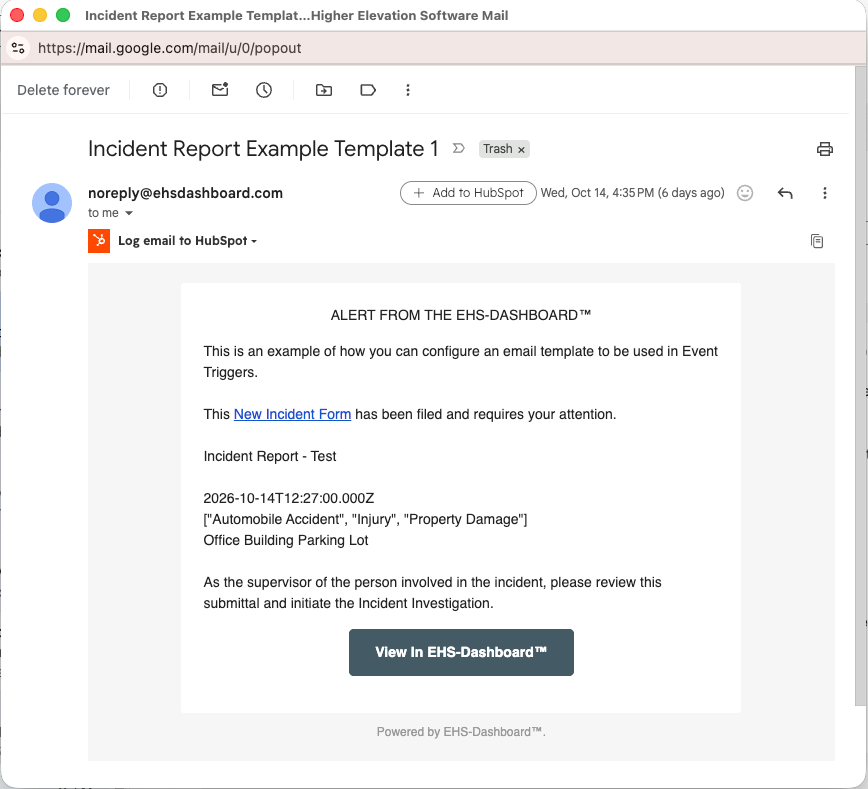
Automated email alerts reach the people who need to act the moment a report is saved or a deadline gets close.

Choose who hears about each incident type, from the EHS manager and supervisor to HR and executives for serious cases. Every alert links straight to the record, and owners get a daily reminder starting 7 days before the due date until the item is closed. 

check-icon-1
Alerts On Submission
check-icon-1
Severity-Based Routing
check-icon-1
Due-Date Reminders
check-icon-1
Overdue Escalation

How Do You Track Incident Rates and Trends?

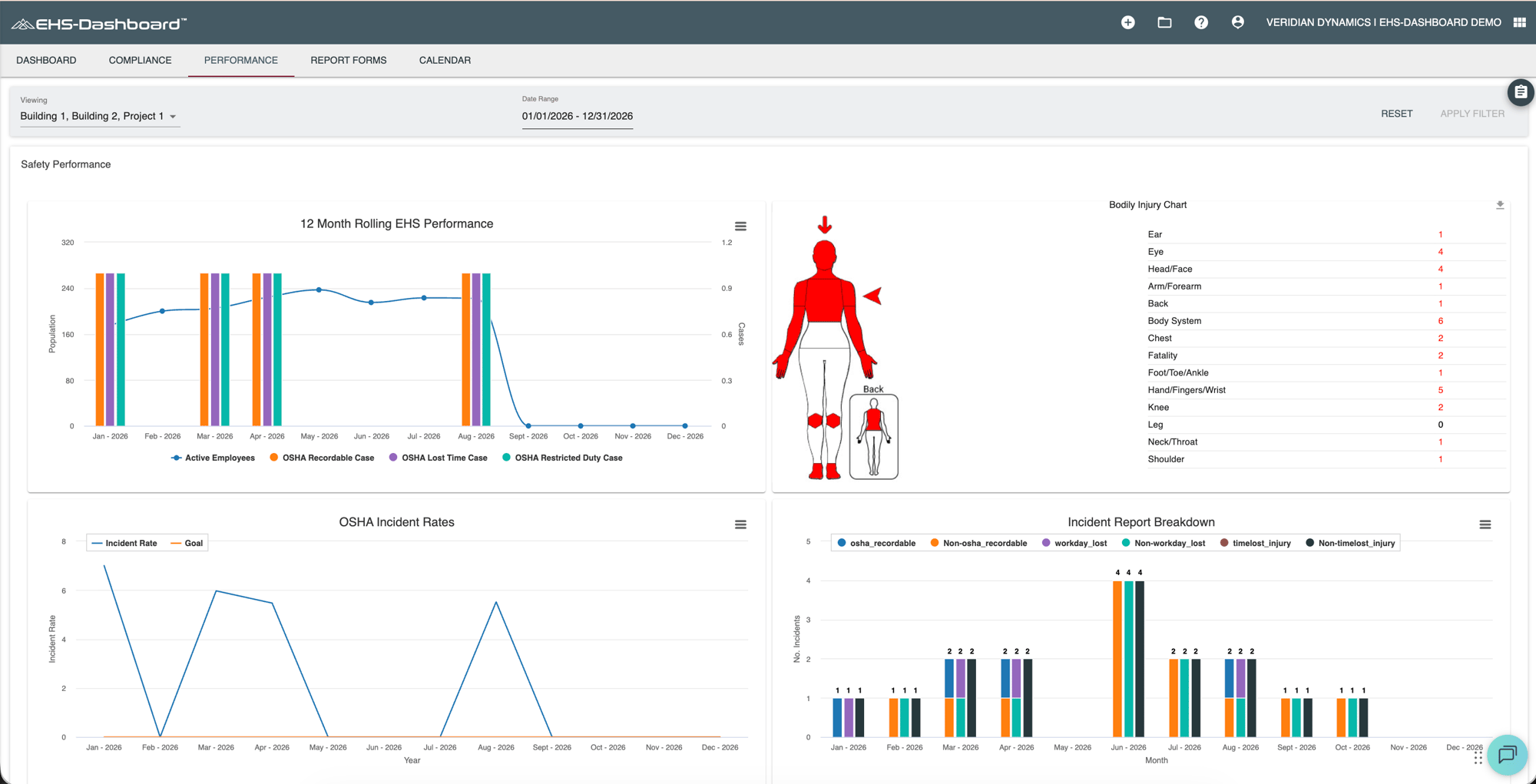
Map your form fields once, and the EHS-Dashboard™ calculates TRIR, DART, lost-workday, and severity rates against your monthly goals. Filter views by facility or date range, and export OSHA Forms 300 and 300A when it's time to prepare your records.

check-icon-1
OSHA 300 and 300A Export
check-icon-1
Rolling 12-Month Rates
check-icon-1
Site and Enterprise Dashboards
check-icon-1
Audit Trail and Data Exports
Screenshot 2026-10-28 at 1.04.06 PM

Why Choose the EHS-Dashboard™ for Incident Management?

The EHS-Dashboard™ centralizes Environmental, Health, Safety, Quality, and Sustainability data, with incident management built in. One subscription covers unlimited users across your sites, with no additional modules to buy.

healthandsafety

Improve Workplace Safety

checkcirlceopen

Close CAPAs on Time

clipboard

Simplify OSHA Recordkeeping

Business

Report Across Every Site

Built by EHS Professionals, for EHS Professionals

  • quote-icon
    “The EHS Dashboard has significantly streamlined our ability to manage compliance across all locations. Its user-friendly interface enhances efficiency and saves valuable time. I also value the EHS team's responsiveness to user feedback and their commitment to continuous improvement, it truly feels like the platform is designed with the end user in mind. It's evident that this tool is purpose-built to support the real-world needs of EHS professionals.”
    Valmet-logo-section
    Jonathan Williams, CSM, LSSBB
    Manager, Health Safety & Environmental, Valmet Inc.
  • Meet the Companies Going Beyond Compliance with Us

    Build Your Incident Workflow in the EHS-Dashboard™ 

    Bring your current incident form and corrective action process, and we'll show you how they could work in the EHS-Dashboard™. Schedule a demo of our incident management software to see how the platform fits your forms and sites. 

    Schedule a Demo

    See how your incident reports, investigations, and CAPAs would run in the EHS-Dashboard™.

    Incident Management Software FAQs

    What types of incidents can the EHS-Dashboard™ track?

    The EHS-Dashboard™ tracks injuries, illnesses, near-misses, property damage, environmental events, good catches, and safety observations. Each type can use its own custom form, fields, and notification rules while feeding the same dashboards and safety metrics.

    Does the EHS-Dashboard™ generate OSHA 300 and 300A forms?

    Yes. Once incident form fields are mapped during Safety Metrics setup, the EHS-Dashboard™ generates OSHA 300 logs and 300A summaries from submitted reports. You can access the reports through Saved Reports, including the OSHA 300A summary as a PDF or a Spreadsheet.

    How do corrective actions connect to incident reports?

    Form logic links them. When an investigator marks corrective action as required, the EHS-Dashboard™ creates a CAPA record tied to the original incident, assigns an owner and due date, and sends reminders until the CAPA is verified and closed.

    Can employees report incidents from a phone or tablet?

    Yes. The EHS-Dashboard™ is browser-based and mobile-responsive, so employees submit reports from a phone or tablet through a direct link or a QR code posted at the site. Photos and attachments upload with the report.

    Who gets notified when an incident is reported?

    You choose the recipients for each form. Notifications can go to the EHS manager, facility manager, safety manager, and employee's supervisor, with serious or confidential cases routed to corporate, HR, or executive contacts. Owners of related tasks get reminders starting seven days before each due date.